The Standing Desk Shortlist: What to Buy in 2026, and What to Skip

Listen to this post · 13 min
Read aloud by a synthetic voice.
Five desks that are actually worth your money, how much you really need to spend, and the setup mistakes that turn a $600 desk into a very expensive monitor shelf.
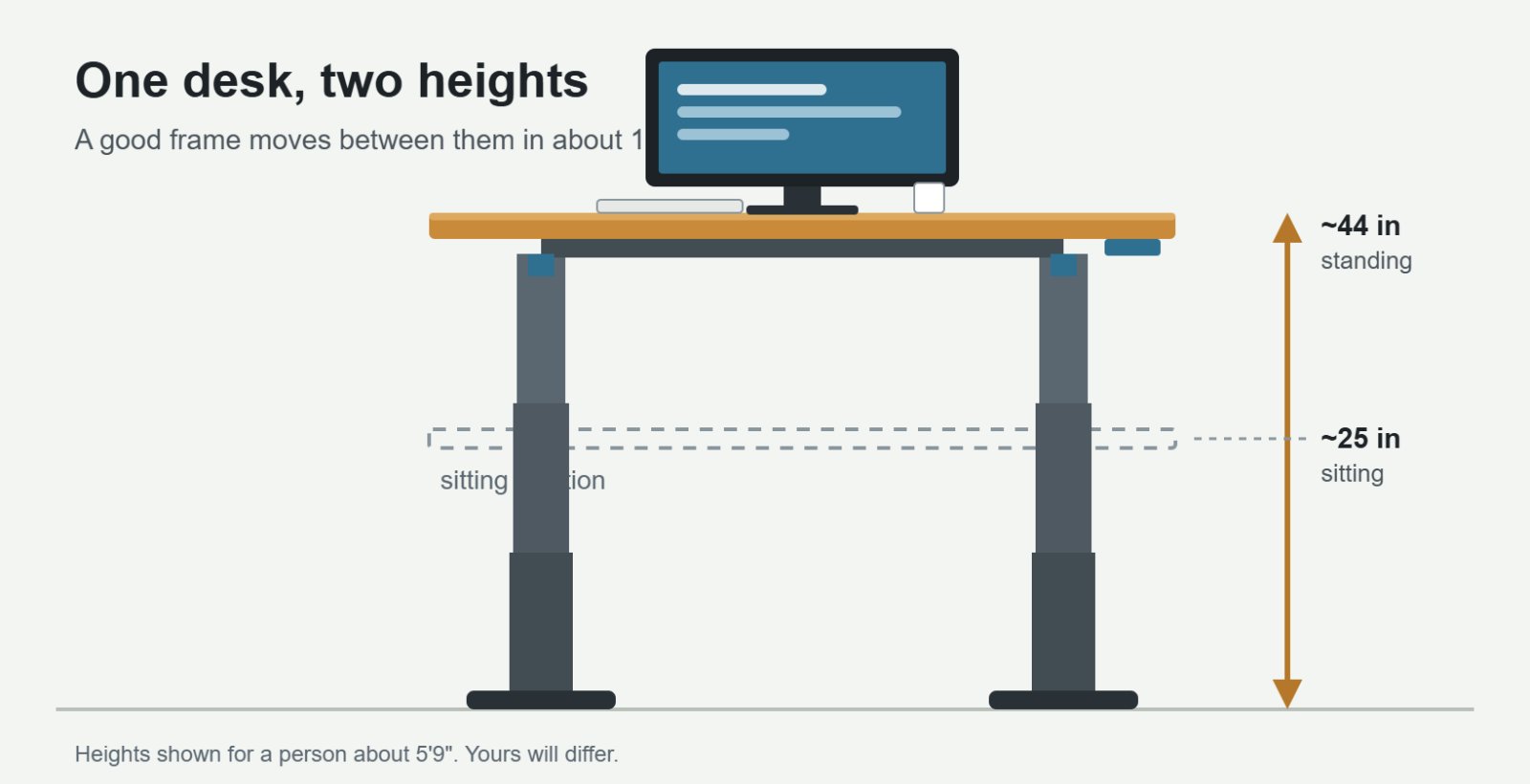
Here's the thing most standing desk guides leave out. Buying the desk is easy. Actually standing at it is where people quit. Plenty of expensive desks spend their whole lives parked at sitting height, holding up a monitor and a cold coffee.
So this guide has two jobs. First, help you pick a desk that won't wobble, whine or die in year three. Second, show you how to set it up and use it so the money pays off.
A quick word on how I built this list. I didn't shake 75 desks in a warehouse. I read through the big 2026 test reports from TechRadar, Wirecutter, Tom's Guide and several dedicated standing desk review sites, lined them up against the manufacturers' own spec sheets, and looked for where the testers agreed. When several people who wrestled with the same desk all say it sways at full height, I believe them. Prices are what the brands were listing in late summer 2026, and they move around a lot, so check before you buy.
The quick picks
Short on time? This is the whole answer in one table.
| Desk | Best for | Price from | Height range | Warranty |
|---|---|---|---|---|
| Uplift V3 | Most people, keep-it-forever buyers | $599 | 22.6–48.7 in | 15 yr |
| FlexiSpot E7 | Best value dual-motor | ~$480 | 22.8–48.4 in | 15 yr (US) |
| Branch Duo | Small rooms, nice looks | $499 | 28–47.8 in | 10 yr |
| Vari Electric (ComfortEdge) | Easy assembly, comfy edge | $899 | 25–50.5 in | Lifetime |
| Fezibo Electric | Trying it on a tight budget | ~$190 | varies | varies |
What you're actually paying for
Every electric standing desk does the same basic job. It lifts a slab up and down. The differences that matter live in the frame, and once you know what the parts are called, the spec sheets stop being gibberish.
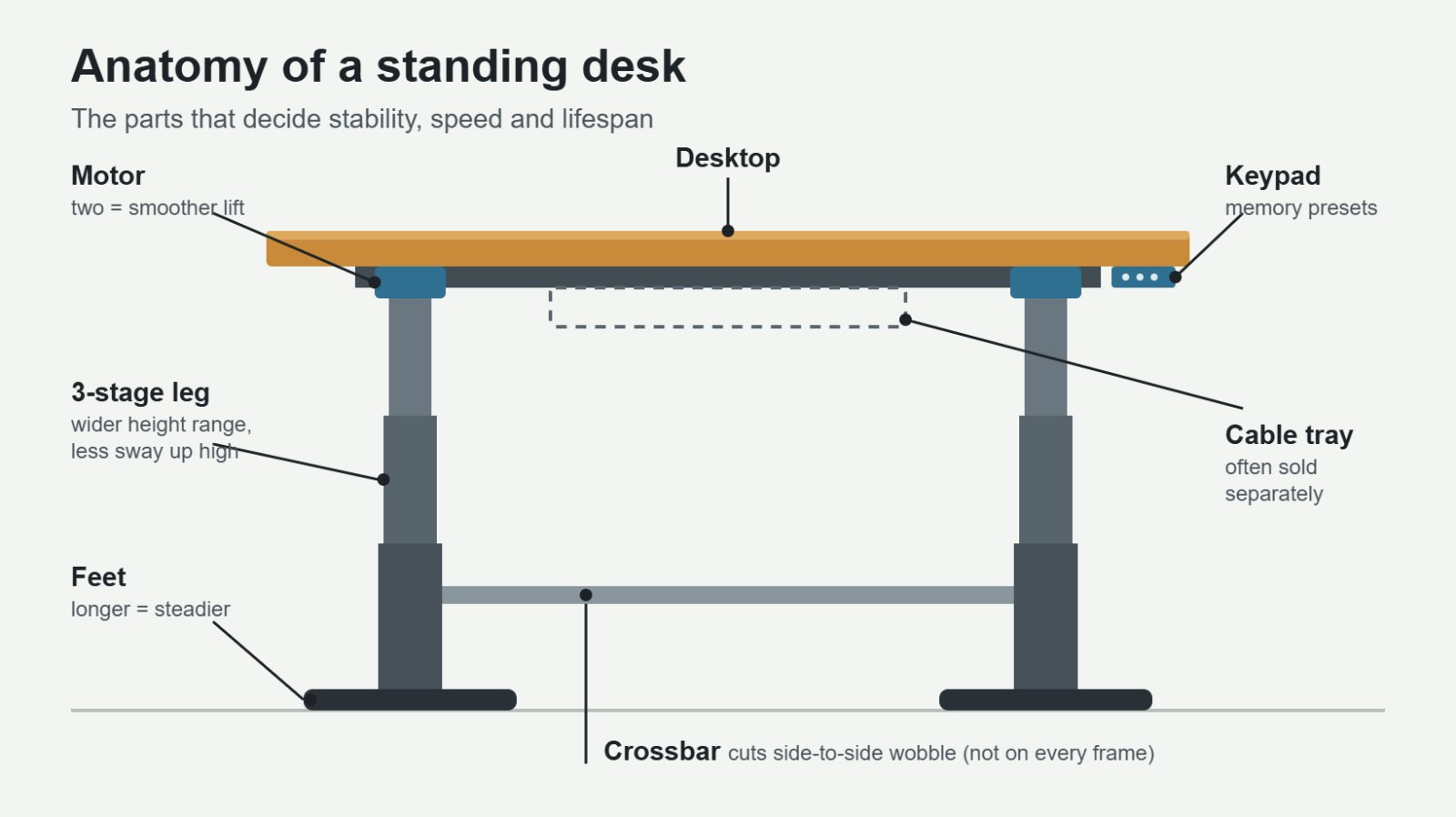
Motors. Cheap desks use one motor that drives both legs through a shaft. Better desks put a motor in each leg. Dual motors lift heavier loads, move faster and, according to one 2026 head-to-head test, can be roughly 30 to 50 percent more stable than single-motor frames at full height.
Leg stages. Two-stage legs have two telescoping sections. Three-stage legs have three, which gives a wider height range and usually less sway at the top.
Lifting capacity. This is how much weight the motors can raise. It's not the same as how stable the desk feels. A 355 lb rating tells you the motors are strong, not that your monitor won't shake while you type.
Warranty. Honestly, this is one of the best signals of build quality. A brand offering 10 to 15 years on the motors is betting its own money that they'll last.
The reviews
Best overallUplift V3
Price: from $599 · Height: 22.6–48.7 in · Capacity: 355 lb · Speed: ~2 in/sec · Warranty: 15 years
Uplift has held Wirecutter's top spot since 2018, and the V3 is the reason it's still there. It arrived in late 2025 and replaced both the old V2 and the V2 Commercial with a single frame. That frame is about a third faster than the V2, goes together with 16 screws instead of 32, and comes with Uplift's FlexMount cable manager in the box.
The height range is the quiet superpower here. Wirecutter says it fits people from roughly 4'9" to 6'8", which covers almost everyone in a typical household. If two people will share this desk, that matters a lot.
The warranty is the other big deal. Fifteen years, and it covers the frame, motors, electronics and even the desktop, including cracks in bamboo tops. Most competitors cover the frame and quietly give the electronics a shorter term.
Why buy itRock steady for multi-monitor setups, huge range of tops and accessories, and the best warranty in its class. Watch out forThe price climbs fast. Bamboo or walnut plus a few accessories puts a typical build at $1,000 to $1,400. Some owners report touchy anti-collision sensors and shipping damage when top and frame arrive in separate boxes.
Best valueFlexiSpot E7
Price: ~$400–480 · Height: 22.8–48.4 in · Capacity: 355 lb · Motors: dual · Warranty: 15 years (US), 10 (UK/EU)
The E7 has been TechRadar's go-to recommendation for years, and for good reason. You get the same 355 lb capacity as the Uplift, a nearly identical height range, dual motors, memory presets and anti-collision detection, usually for $100 to $200 less.
If you like the idea but want a little more polish, FlexiSpot's E7 Pro starts around $549 and was TechRadar's top overall pick in its most recent update. The E7 Pro Plus adds a USB port on the keypad, which is handier than it sounds.
Why buy itAbout 80 percent of a premium desk for a lot less money. Quiet, strong, and backed by a long warranty in the US. Watch out forWirecutter's testers dropped it for wobble at maximum height, so very tall users should take note. Cable management costs extra.
Best for small spacesBranch Duo
Price: $499–549 · Height: 28–47.8 in · Capacity: 275 lb · Motors: dual · Warranty: 10 years
The Duo is the desk for people who don't want their living room to look like an office. It has a clean, frameless look, ten desktop finishes and five leg colors, and it comes in compact sizes starting at 36 by 24 inches. Wirecutter named it the best pick for smaller rooms.
There's one catch, and it's a big one for some people. The lowest setting is 28 inches. That's too high for many shorter adults to sit at comfortably, which is why Wirecutter recommends it mainly for people between about 5'8" and 6'5".
Why buy itLooks like furniture, fits tight spaces, and still gets you a dual-motor lift at a fair price. Watch out forHigh minimum height. The control paddle is less intuitive than a standard keypad, and you get fewer presets.
Easiest to live withVari Electric Standing Desk with ComfortEdge
Price: $899 (60×30, often on sale) · Height: 25–50.5 in · Capacity: 200 lb · Warranty: lifetime
If assembly makes you want to cry, look here. Tom's Guide put the Vari Electric together in under 15 minutes with eight bolts. The ComfortEdge version adds a softly contoured front edge, so your forearms aren't pressing into a hard corner all day. And Vari now backs its full-size electric desks with a lifetime warranty.
It also has the tallest maximum height on this list, which is good news for anyone over 6'3". Keep an eye on sales. TechRadar spotted it for under $600 during last year's holiday deals.
Why buy itFast setup, a genuinely comfortable edge, high top height and a lifetime warranty. Watch out forFull price is steep, the 200 lb capacity is the lowest here, and tops are laminate only.
Best budgetFezibo Electric Standing Desk
Price: ~$180–199 · Top: 48×24 in · Capacity: 154 lb · Presets: 4
Not sure you'll actually stand? The Fezibo is a low-risk way to find out. You get a 48-inch top, four memory presets and a cable tray for under $200. TechRadar's reviewer still names it as the pick for anyone who wants a no-fuss, affordable height-adjustable desk.
Why buy itCheap, simple, and good enough for a laptop plus one monitor. Watch out forMore wobble, slower lifting and a much lower weight limit. Think of it as a trial run, not a ten-year desk.
Keeping your current desk? A converter sits on top of the desk you already own. The VariDesk Pro Plus 36 ($429) ships fully assembled and is still the one to beat. Just know that converters raise your whole setup and tend to feel less steady than a proper frame.
How much should you spend?
Most people land somewhere between $230 and $600. Below about $300 you're usually getting a single motor, a lower weight limit and more wobble at standing height. A solid dual-motor desk runs $400 to $700. Premium and L-shaped frames go from $700 to well over $1,200.
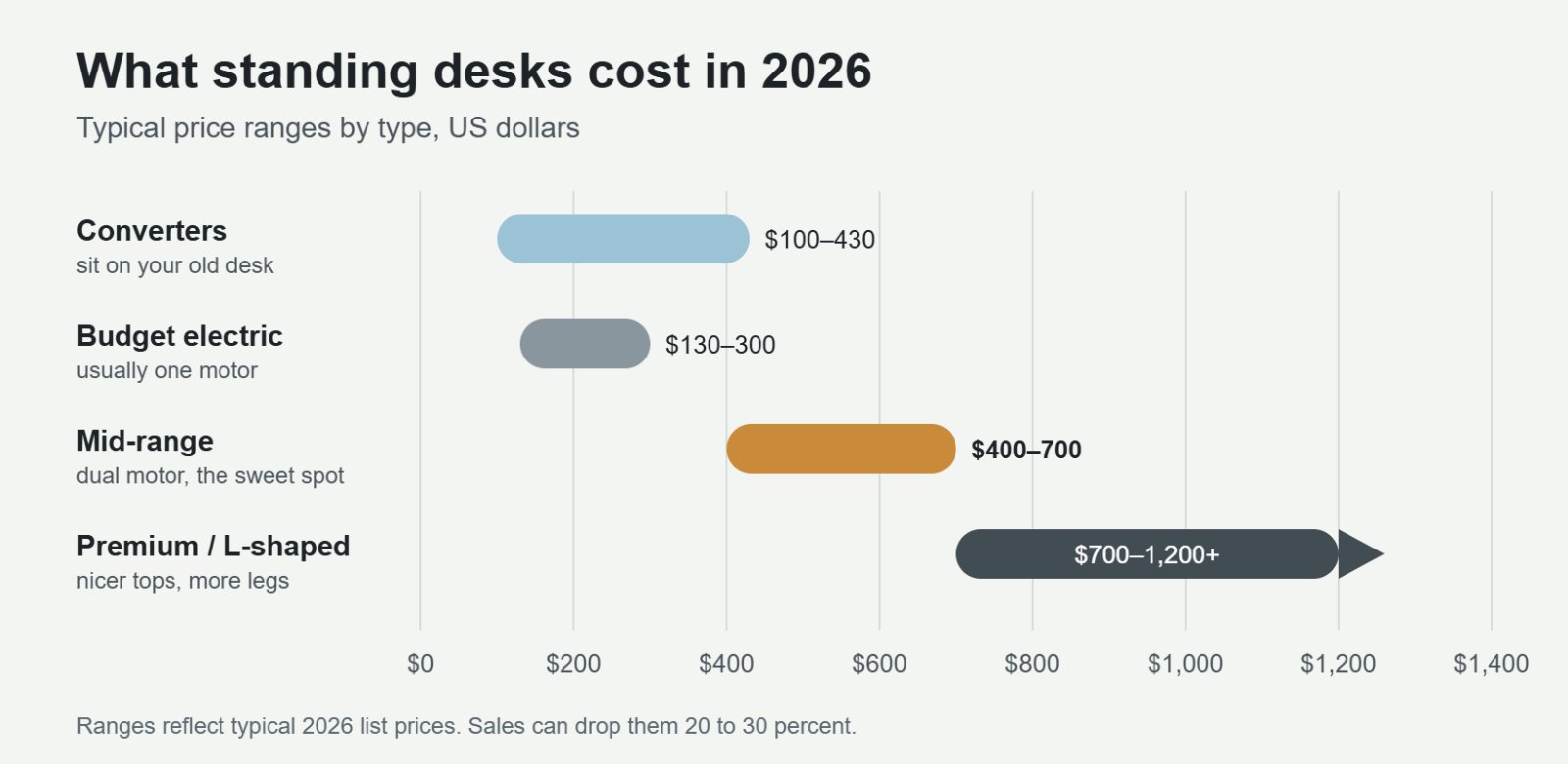
My honest advice: if you think you'll use it every day, skip the bottom tier. The wobble on cheap frames is the kind of annoyance that slowly trains you to stop raising the desk. Spend a little more once instead of buying twice.
The buying checklist
1. Check the height range against your body
This is the spec people ignore and then regret. Your desk needs to go low enough for you to sit with your elbows at about 90 degrees, and high enough to do the same while standing in shoes. Shorter people struggle with high minimums. Taller people run out of room at the top.
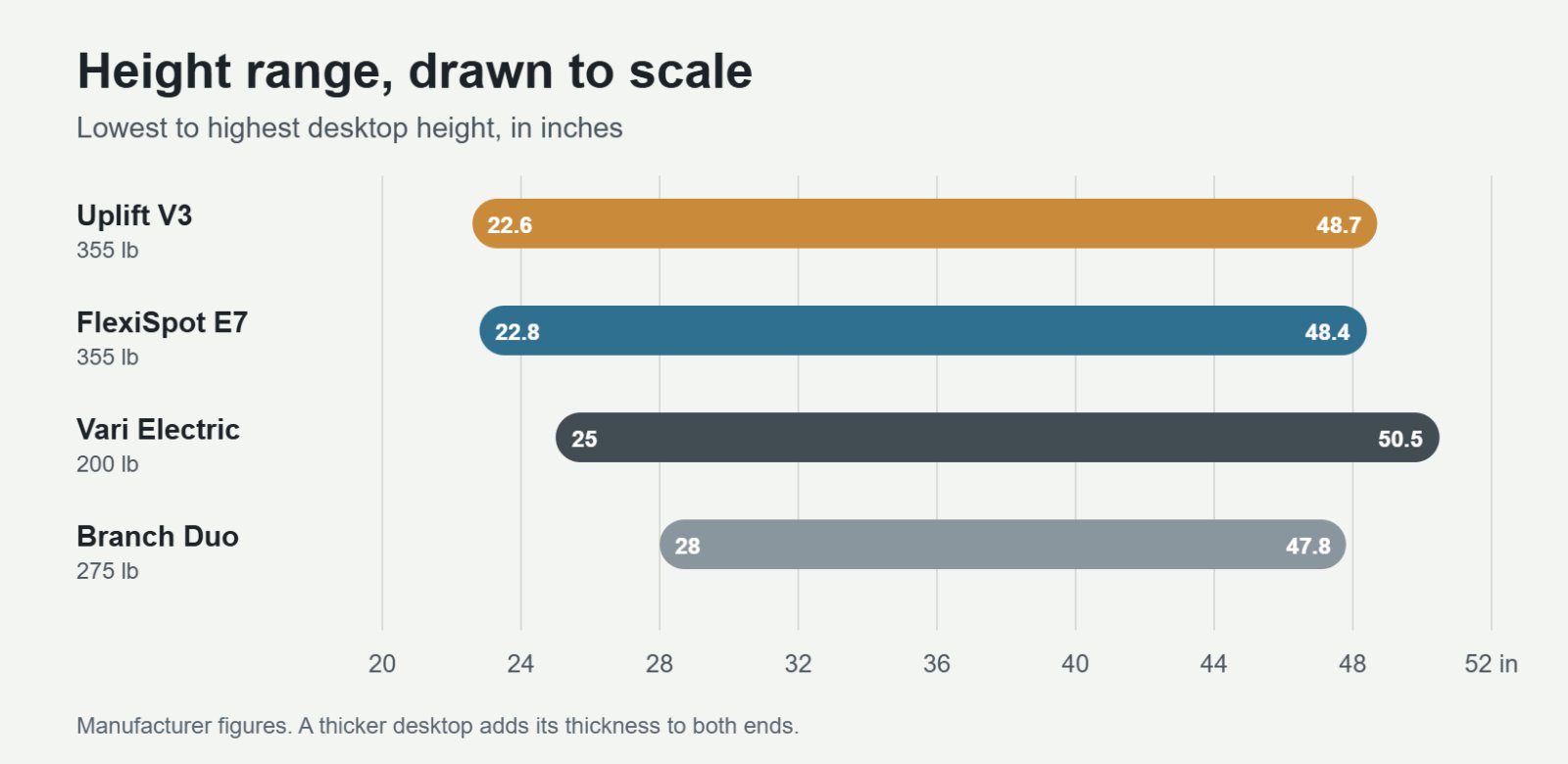
Not sure what heights you need? Use this rough guide, then confirm by measuring from the floor to the underside of your forearm with your elbows bent at 90 degrees.
| Your height | Sitting desk height | Standing desk height |
|---|---|---|
| 5'0" | ~22.5 in | ~38 in |
| 5'4" | ~24 in | ~40.5 in |
| 5'8" | ~25.5 in | ~43 in |
| 6'0" | ~27 in | ~45.5 in |
| 6'4" | ~28.5 in | ~48 in |
These are approximations with shoes on. Arm length and chair height shift things by an inch or two either way.
2. Look for stability, not just capacity
Wobble is the number one complaint about standing desks, and it gets worse the higher you go. Look for dual motors, three-stage legs and long feet. A crossbar between the legs helps too. If you run two big monitors on arms, a 30-inch-deep top gives you more distance from the screens and spreads the load better than a 24-inch one.
3. Measure your room with tape, not guesses
Mark the desktop footprint on the floor with painter's tape. Include drawers, door swings and the path to get the boxes into the room. Then set your monitors and speakers inside the tape outline. You'll find out fast whether you need 48 inches or 60.
4. Read the warranty fine print
A "15-year warranty" can mean 15 years on the steel frame and five on the parts that actually break. Motors and control boxes are what fail, so check how long those are covered. Uplift, FlexiSpot's US warranty and Vari's lifetime coverage are the strongest on this list.
5. Small features you'll use every day
Memory presets save your sitting and standing heights, so you tap once instead of holding a button. Anti-collision stops the desk if it hits a chair arm or windowsill on the way down. A keypad with a USB port is nice. Built-in reminders are nice too, though most people end up ignoring them.
Set it up right, or don't bother
A great desk at the wrong height will hurt you just as much as a bad one. The goal is the same in both positions. Shoulders relaxed, elbows near 90 degrees, wrists straight, and the top of the screen at or a bit below eye level.
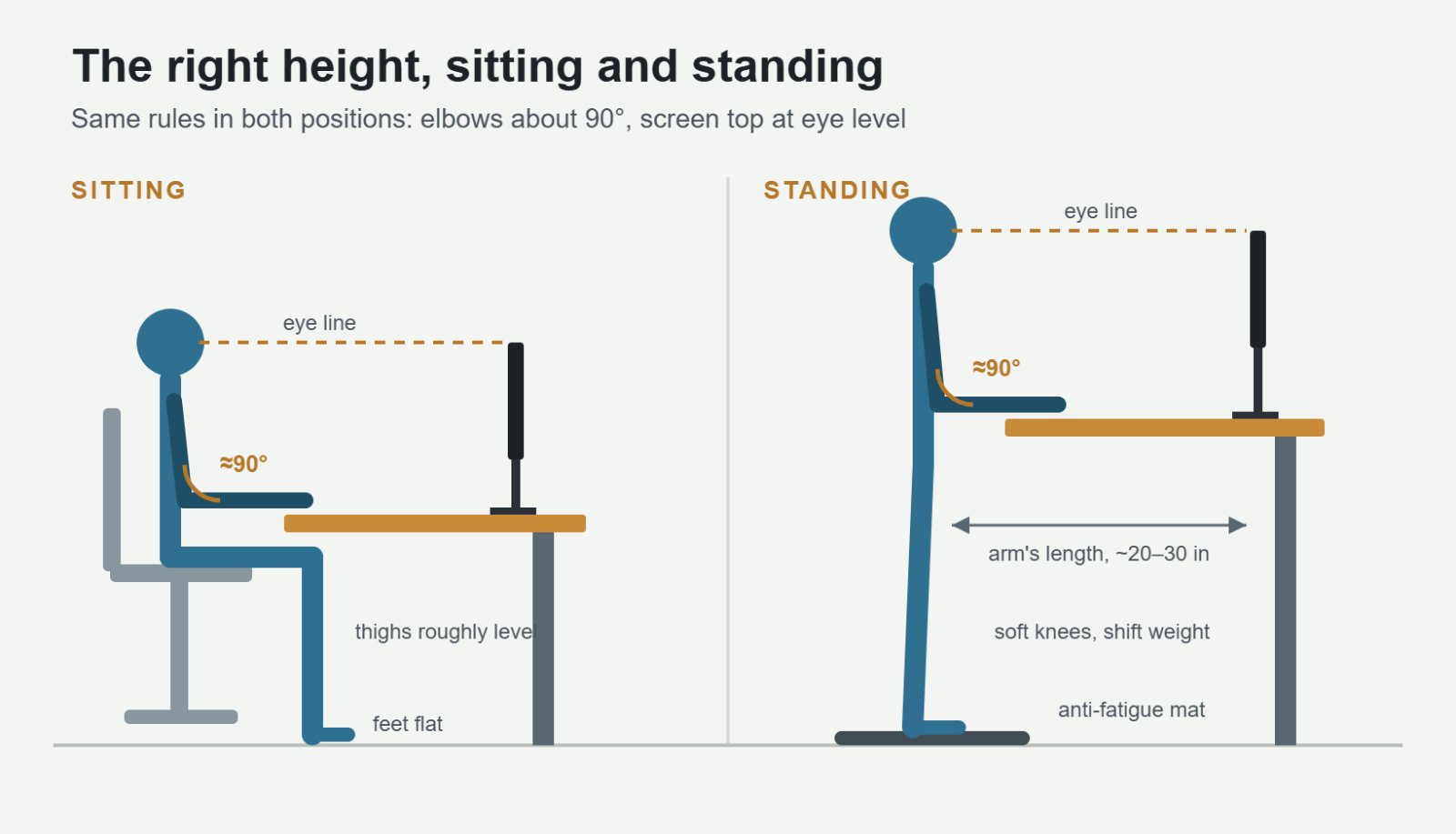
Two cheap upgrades make standing far more comfortable. An anti-fatigue mat takes a surprising amount of strain off your feet and lower back. And a monitor arm lets you fine-tune screen height without stacking books under the stand.
How long should you actually stand?
Standing all day isn't the goal. Your body wants variety. Cornell University ergonomist Alan Hedge popularized a simple rhythm that's easy to remember: in every half hour, sit for about 20 minutes, stand for about 8, and move around for 2.
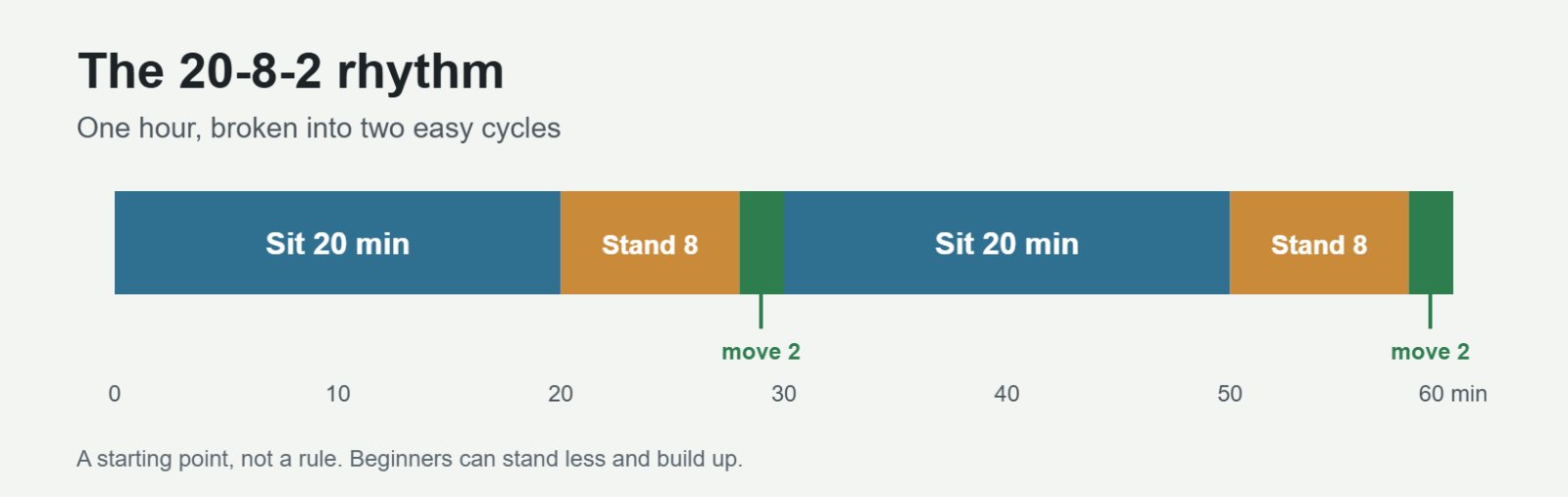
If you're new to this, start small. Stand for a few minutes each hour for the first week and add time as your feet adjust. The easiest trick I know is tying it to something you already do. Stand for every video call, or every time you check email. Habits stick better than timers.
So which one should you buy?
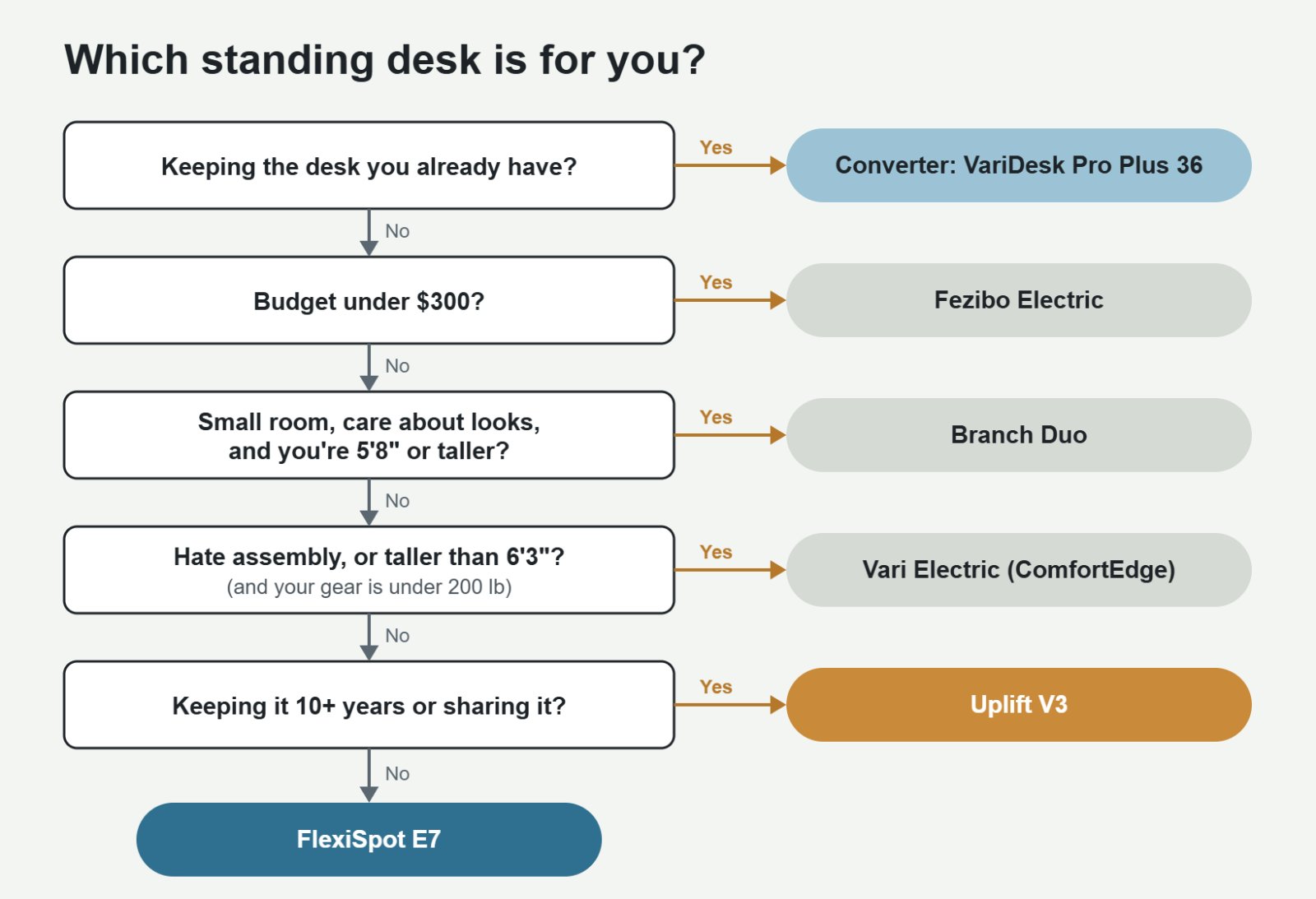
Follow the arrows. Most people end up at one of the last two boxes.
Quick answers to common questions
Is a standing desk worth it?
If you'll use it, yes. The benefit comes from changing position through the day, not from standing itself. If you already know you're the type to never press the button, a good chair and regular walking breaks will do more for you.
Single motor or dual motor?
Dual, if you can stretch the budget. It's faster, quieter, handles more weight and wobbles less. Single-motor desks are fine for a laptop and one light monitor.
Can I use my own desktop?
Yes. Many brands sell the frame alone. Uplift's V3 frame runs about $469 and Fezibo sells an electric frame for around $219. Just make sure your top is thick enough to hold the screws and not wider than the frame is rated for.
Should I buy an L-shaped desk?
Only if you truly need the corner surface. They cost more, need a third leg and motor, and are much harder to move. Uplift's 3-leg L-shaped model starts at around $1,149.
The bottom line
For most people, the Uplift V3 is the desk to get. It's stable, fits almost any body, and has a warranty that makes the price easier to swallow. If you'd rather keep a couple hundred dollars, the FlexiSpot E7 gets you most of the way there. Tight room? The Branch Duo, as long as you're tall enough for its minimum height. And if you just want to see whether standing sticks, the Fezibo is a cheap experiment.
Whichever you pick, set your two presets on day one, put a mat on the floor, and tie standing to something you already do. That's the part that turns a nice piece of furniture into a better workday.
Sources
- TechRadar: The best standing desks of 2026
- Summary of Wirecutter's 2026 standing desk picks
- Tom's Guide: Top standing desk picks for every budget
- Standing Desk Reference: Uplift V3 specs and pricing
- Remote Office Guy: Uplift V3 review
- StandDeskLab: Every Uplift desk ranked
- StandDeskLab: Best Branch standing desk
- StandDeskLab: Best Vari standing desk
- StandDeskLab: How much does a standing desk cost?
- Standing Desk Picks: Fezibo vs FlexiSpot E7
- Standing Desk Picks: Dual vs single motor stability
- CompanionLink: Vari Electric alternatives
Filed under CraftTechnologyLeisure
Comments
No comments yet. Start the conversation.
Sign in to comment. It takes an email address, no password.